


Pedágio Digital
3,8134.00 Arvustused
Rakenduse andmed
- Versioon
- 1.1.36
- Uuendatud
- Litsents
- Free
- Allalaadimised
- 100 000+
- Arendaja
- Pedágio Digital
- Kategooriad
- Autod ja sõidukid
- Platvorm
- Android
Ekraanipildid
 Analüüsis AppCompare
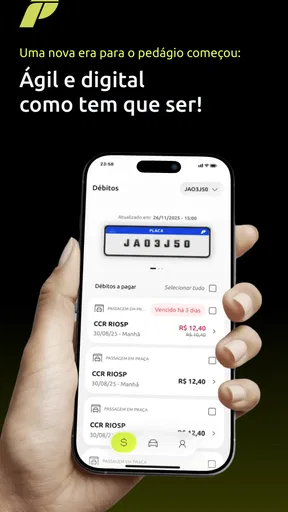
Pedágio Digital on Android is aimed at one very specific but increasingly familiar task: handling Free Flow toll payments without turning a road journey into paperwork. I tested it from the point of view of someone who wants to understand what is owed, check the relevant toll passage and complete payment with as little friction as possible. My overall impression is that it is most useful as a focused companion for drivers who regularly use roads with this type of tolling, rather than as a complete travel or vehicle-management app.
The app belongs to the cars and vehicles category and is developed by Pedágio Digital. It is free to use, carries a PEGI 3 age rating and has reached over one hundred thousand installs. Its average score is around 3.8, based on more than two hundred ratings and over one hundred written reviews. That combination tells me something important: there is clear interest in the service, but the experience is not universally smooth for every driver or every situation.
Selge ülesehitus aitab kiirel hetkel
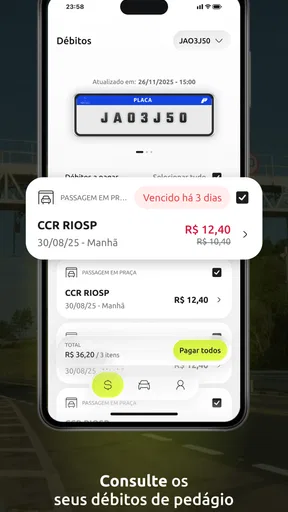
My first concern with a toll-payment app is not how many buttons it has, but whether I can understand the next step while I am busy with a journey. Pedágio Digital works best when approached as a short sequence: open the service, identify the relevant vehicle or passage information, check the amount and proceed with payment. That focused purpose is a strength because it avoids the clutter I often associate with broader mobility applications.
Hea loetavus algab sellest, et kasutaja ei pea teemaksu tähendust ise lahti mõtestama. A driver who has just arrived home after a long trip should be able to distinguish between an unpaid toll, a completed transaction and a request for more information. In my view, this is where a specialist app has an advantage over searching through a general road authority website or trying to interpret a message received after the journey.
The most useful habit is to open the app when you are calm, not only when a payment deadline is already worrying you. I would first check how the vehicle details are presented, then note where the payment status appears and finally confirm which action leads to the actual payment screen. This small familiarisation step matters for older users, people with limited digital confidence and anyone who finds time pressure makes reading a phone screen harder.
Navigation also needs to work for people who do not use apps every day. A screen can look simple to an experienced smartphone user while still being confusing to somebody who is unsure whether a button confirms a payment or merely opens more information. Pedágio Digital’s narrow purpose gives it a good starting point, but the practical test is whether labels remain understandable without prior knowledge of Free Flow tolling.
I would not treat the app as a place to explore casually. It is better used with a clear goal: verify a charge, settle it, or check the status of a passage. That makes the experience easier to remember and reduces the chance of tapping through unrelated screens. If you are helping a family member, show them this three-step routine rather than explaining every part of the service at once.
Tasub enne valimist lugeda
Moovit ei juhi busse, kuid mõjutab seda, kuidas linnas liigume
Nädala valik: Microsoft 365 Copilot aitab tööga kiiremini alustada

VLC Androidis: vabadus jääb, seadistamist tuleb juurde
Hill Climb Racing täidab lühikesed pausid, kuid ei püsi kaua värske

Woodturning pakub telefonimüras lühikest ja rahulikku pausi

Miks Reddit tõmbab kasutajad endiselt tagasi
Kontrollimine enne maksmist on tähtsam kui kiirus
One detail I consider especially important is the pause before final confirmation. A quick payment flow is welcome, but speed should not replace verification. I would check the vehicle information, the passage details and the amount shown before completing the transaction. This is useful not only for avoiding mistakes, but also for users with reading difficulties who may benefit from taking one screen at a time instead of trying to remember several details simultaneously.
The app’s value is therefore not simply that it allows payment. It creates a single place where the driver can connect a road passage with an action. That can be much easier than keeping paper notes, searching old messages or switching between a browser, a bank application and a toll operator’s page. However, it still requires the user to read carefully. Anyone hoping for a completely automatic experience may find that the final responsibility remains with them.
For people with reduced vision, the most comfortable approach is to increase the phone’s system text size before using the app and keep the display free from glare. I would also avoid completing a payment outdoors in bright sunlight if the screen is difficult to read. These are not special functions of the application, but they make a real difference because a toll record often contains several pieces of information that should not be guessed.
Erinevad motoorsed ja sensoorsed vajadused
Pedágio Digital is used through a touchscreen, so the experience depends on the user’s ability to tap, scroll and enter information accurately. For someone with hand tremors, limited finger movement or difficulty making small touch targets, a short payment process can still become tiring. I recommend using the phone on a stable surface rather than holding it in one hand, especially when checking a long record or typing vehicle details.
Voice control and system-level accessibility tools may help some users, but I would not assume that every part of the payment process is equally comfortable through them. A person who relies on screen reading should test the main flow before depending on the app during a trip. The important question is not whether the phone has an accessibility mode, but whether each label, status and confirmation is announced in an understandable order.
People with hearing loss should not be disadvantaged by a service that communicates essential information visually. For this type of app, visible status messages are more useful than relying on sounds or vibrations alone. When I review a payment screen, I look for confirmation that can be read directly rather than inferred from a notification sound. That is also helpful in noisy environments such as a service station, a busy car park or a roadside rest area.
Users with cognitive disabilities may benefit from a predictable routine and assistance with the first setup. I would suggest writing down the exact sequence in plain language: open the app, review the vehicle and passage, check the amount, then confirm. A trusted person can help with the initial configuration without taking over every later payment. That balance supports independence while reducing the risk of a wrong vehicle or an unrecognised charge.
There is also a sensory issue that is easy to overlook: stress. A driver who has just discovered a toll notice may be anxious and less able to process dense text. The best experience will be the one that presents one decision at a time. If the screen makes the user compare several similar options or remember information from a previous page, the app becomes less inclusive even if the overall design looks modern.
Kasutamine autos, kodus ja halva ühenduse korral
The safest context for Pedágio Digital is at home, after the journey, with the vehicle parked and enough time to read. I would not recommend trying to use it while driving, waiting in moving traffic or handling a toll-related task at the roadside. Payment convenience should never create a distraction. A passenger may help during a stop, but the driver should keep attention on the road.
A realistic everyday example would be a person returning from a weekend trip and later receiving a reminder about a Free Flow passage. Instead of searching through several websites, they open the app, identify the vehicle, review the charge and complete the payment from the sofa. If an older relative made the trip, a family member could sit beside them and explain the status without needing to manage the entire process on their behalf.
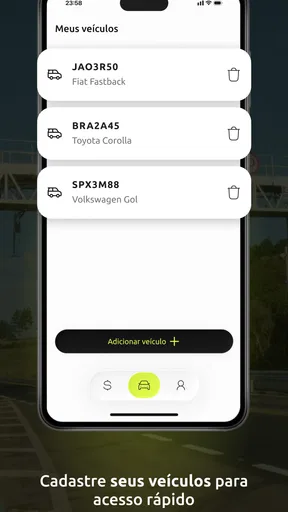
Another useful situation is managing more than one vehicle in a household. The practical risk here is choosing the wrong record, not necessarily finding the payment button. I would slow down whenever two vehicles have similar descriptions or when another family member used the car. Checking the plate or identifying information before confirmation is a simple habit that prevents an avoidable error.
Travellers should also plan for the possibility that the phone connection is poor. I would not wait until reaching a remote area to investigate a toll. If a passage needs attention, handle it when you have a stable connection and a charged phone. The app is convenient precisely because it reduces bureaucracy, but digital convenience still depends on the ordinary realities of a smartphone: battery, signal, readable screen and the ability to complete a payment securely.
For users who are not comfortable with Portuguese terminology, language can become part of accessibility. The name and purpose are easy to recognise, but toll-related wording may still require attention. I would advise checking the meaning of each status rather than relying only on familiar-looking buttons. If you are assisting someone, explain the terms in everyday language and let them confirm the vehicle and amount themselves.
Kus rakendus ei pruugi olla parim valik
The biggest limitation is the app’s narrow scope. It is designed around Free Flow toll payments, so it should not be mistaken for a complete navigation tool, a general parking application or a full vehicle-management system. If your main need is route planning, fuel tracking, maintenance reminders or broad travel budgeting, another app will be a better centre for those tasks. Pedágio Digital makes more sense as a dedicated tool used when a toll record needs attention.
I also would not choose it as the only method for people who strongly prefer face-to-face service or paper records. A digital payment flow can be simpler than bureaucracy for one person and less comfortable for another. Someone who struggles with touchscreens, online payments or reading small amounts of text may need a trusted helper. That is not a failure of the idea, but it is a real boundary of app-based toll management.
The average score of about 3.8 suggests a reasonably useful service with room for a smoother experience. I would interpret that carefully rather than treating it as either an endorsement or a warning. A toll app can work well for one driver and still frustrate another because of differences in vehicle records, timing, connection quality or expectations about automation.
Version 1.1.36 runs on Android 8.0 and later, which keeps it available to people who do not replace their phone frequently. That is positive from an inclusion perspective, since requiring a recent device would exclude users with older but still functional phones. At the same time, older hardware may respond more slowly or display screens differently, so I would test the complete flow before relying on it for an urgent payment.
There is a useful trade-off between the app and the usual browser alternative. A website may be preferable if you are using a computer with a large monitor, a physical keyboard or assistive software that you already know well. The app is more practical when the phone is the device you have at hand and you want a focused route to the toll record. For a user with a motor disability, the better option may simply be the interface that works with their existing setup, not the one labelled as mobile.
Praktiline töövoog eri kasutajatele
My recommended workflow is deliberately cautious. First, use the application while parked and make sure the correct vehicle is selected. Next, read the passage information and amount without rushing. Then, if everything matches your journey, continue to payment and wait for a clear confirmation. Finally, keep the confirmation available long enough to recognise that the process has finished. This routine is short, but it addresses the most likely human mistakes: distraction, wrong vehicle selection and premature closing of the app.
For a user with low vision, I would combine that routine with larger system text, strong screen contrast and a quiet environment. For a user with limited dexterity, placing the phone flat and using one deliberate finger tap at a time is safer than rapid scrolling. For a user with memory difficulties, a written reminder beside the phone can make the sequence less dependent on recalling instructions.
For a family or small business with shared vehicles, I would separate assistance from authorisation. One person can help locate the correct record, while the person responsible for the vehicle checks the details and confirms the payment. This reduces the chance that a helpful relative or colleague pays the wrong toll simply because they were trying to be quick.
If a payment screen is unclear, I would stop rather than repeatedly tap. Repeated taps can create uncertainty about whether an action was accepted, especially for someone with a slow connection or a screen reader. Returning to the visible status and checking what changed is a better approach than assuming the first tap failed. This is one of the moments when patience is more valuable than speed.
I would also avoid making the app part of a driving routine. The right time to use it is before departure when preparing for a known journey, or after arrival when the vehicle is safely parked. That simple rule makes the service more accessible to people who become overwhelmed by multitasking and protects every driver from turning a payment task into a road-safety problem.
Minu hinnang kaasavale kasutuskogemusele
Pedágio Digital succeeds when the user needs a direct way to deal with a Free Flow toll and is comfortable completing a digital payment on an Android phone. Its focused purpose, free access and support for devices running Android 8.0 or later make it a practical option for many drivers. The developer, Pedágio Digital, has chosen a problem that is easy to understand: replace a confusing administrative task with a more direct mobile workflow.
My recommendation is strongest for drivers who want to check toll passages from home, prefer a phone to a browser and can comfortably review vehicle and payment details. It is also useful for relatives assisting someone else, provided the person making the payment remains involved in checking the information. The app’s value is less about advanced extras and more about putting the relevant action in one place.
I would be more cautious for anyone who needs a highly customisable accessibility experience, depends entirely on voice or screen-reading support, or prefers a computer-based process with a large display. Those users should try the complete journey before an urgent payment is needed. If the labels, focus order or touch targets do not work with their setup, a familiar web or assisted alternative may be the better choice.
In the end, I see Pedágio Digital as a useful specialist app rather than an all-purpose motoring companion. It reduces the search and paperwork around Free Flow tolls, but it does not remove the need for attention, a working connection and a final check. For me, that makes it worth keeping on the phone if these tolls are part of your regular travel, especially when you use the app calmly, park first and treat accessibility as part of the payment process rather than an afterthought.
The most inclusive way to use it is simple: prepare the phone, choose a comfortable setting, enlarge the text if needed, verify the vehicle and amount, and only then confirm. That approach will not solve every barrier, but it gives the app its best chance to serve different ages, abilities and travel contexts without adding unnecessary stress.
Plussid
- Mugav viis teemaksude haldamiseks otse telefonis.
- Võib vähendada vajadust sularaha või füüsilise pileti järele.
- Ligipääs makseteabele on alati mobiilis käepärast.
- Sobib kasutajatele
- kes liiguvad sageli tasulistel teedel.
- Digitaalne lahendus võib muuta teekonna planeerimise lihtsamaks.
Miinused
- Rakenduse kasutamine sõltub toimivast internetiühendusest.
- Kõik teemaksud või piirkonnad ei pruugi olla toetatud.
- Vale sõiduki- või makseinfo võib põhjustada lisakulusid.
- Mõne funktsiooni kasutamiseks võib olla vaja kasutajakontot.
- Privaatsustundlikud kasutajad võivad muretseda asukohaandmete pärast.
Korduma kippuvad küsimused: Pedágio Digital
Mis on Pedágio Digital ja milleks seda rakendust kasutatakse?
Pedágio Digital on rakendus, mis aitab kasutajatel hallata elektroonilisi teemakse ja tasulistel teedel liikumisega seotud toiminguid. Rakenduse kaudu võib olla võimalik kontrollida teemaksuandmeid, jälgida sõite, vaadata maksete ajalugu ning saada teavitusi võimalike tasumata summade kohta. Enne kasutamist tasub kontrollida, millistes piirkondades ja milliste teemaksusüsteemidega rakendus ühildub.
Kas Pedágio Digital töötab kõigis riikides ja kõigil tasulistel teedel?
Rakenduse toimivus sõltub sellest, milliste teede, operaatorite ja elektrooniliste teemaksusüsteemidega Pedágio Digital ühendatud on. See ei pruugi töötada kõikides riikides ega katta iga tasulist maanteed, silda või tunnelit. Enne reisi soovitame kontrollida rakenduse ametlikust kirjeldusest toetatud piirkondi ning veenduda, et teie sõiduki registreerimisnumber ja kontoandmed on õigesti sisestatud.
Kuidas Pedágio Digitalis teemaksu tasumine toimub?
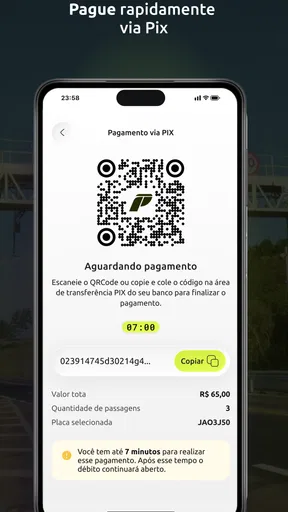
Tavaliselt tuleb rakenduses luua konto, lisada sõiduki andmed ja valida sobiv makseviis, näiteks pangakaart või muu rakenduse toetatud makselahendus. Mõnes süsteemis toimub tasumine automaatselt pärast tasulisel teel sõitmist, teistes tuleb arve või sõit käsitsi kinnitada. Tingimused võivad erineda, seega kontrollige alati summat, maksetähtaega ja rakendustasu enne kinnitamist.
Kas Pedágio Digital on tasuta või võivad kasutamisega kaasneda lisatasud?
Rakenduse allalaadimine võib olla tasuta, kuid teemaksude tasumine ise ei ole tasuta ning teatud juhtudel võivad lisanduda teenustasud, haldustasud või maksetöötleja tasud. Samuti võivad erinevad funktsioonid sõltuda kasutatavast piirkonnast või kontotüübist. Enne makse kinnitamist vaadake hoolikalt üle lõplik summa ja rakenduse kasutustingimused, et vältida ootamatuid kulusid.
Mida teha, kui Pedágio Digital ei registreeri sõitu või makse ebaõnnestub?
Kui sõit ei ilmu rakendusse või makse ebaõnnestub, kontrollige esmalt internetiühendust, sõiduki registreerimisandmeid, konto saldot ja lisatud makseviisi kehtivust. Ärge tehke kohe kordusmakset, kui te pole kindel, kas esimene tehing siiski õnnestus, sest see võib põhjustada topeltmakse. Probleemi püsimisel salvestage veateade ning pöörduge rakenduse ametliku klienditoe poole.


